Medical Clinic Software
Medical records, scheduling, QR-code prescriptions and a patient portal in one system.
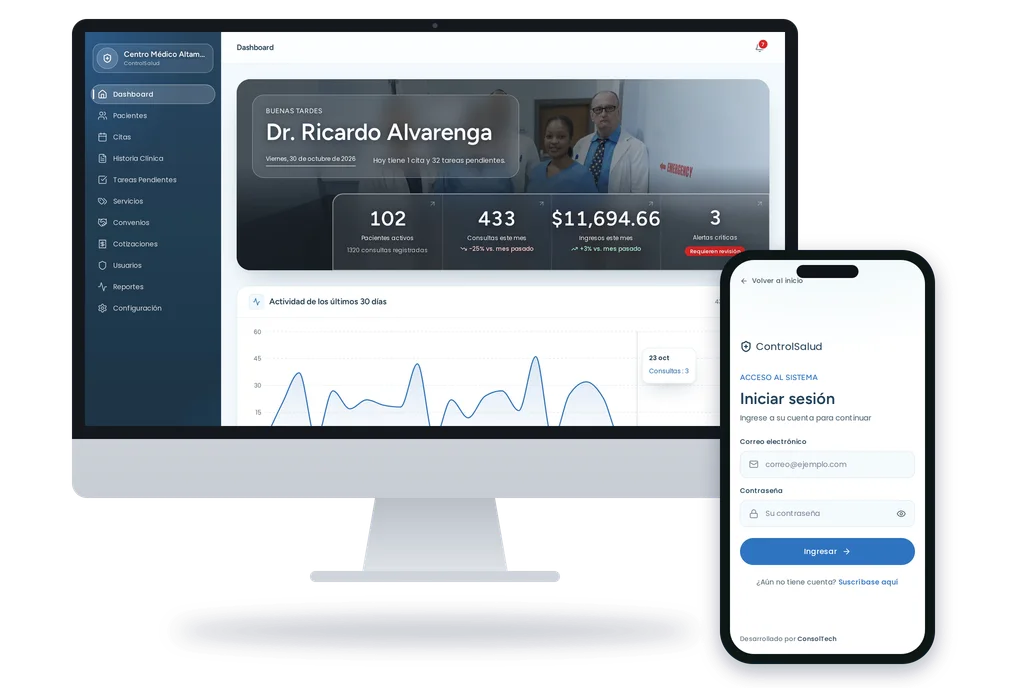
Every time you prescribe without the allergies and current medication in view, your reputation is on the line. Every patient who doesn't show up is a visit that doesn't happen. Every paper record is lost time and a risk of loss. ControlSalud brings together patient records, clinical history, scheduling, prescriptions, test results and medication inventory in one place, and gives each patient their own link to see what's theirs. It works from the browser, with nothing to install.
What the medical clinic software does
Functionality designed to maximize your productivity and efficiency
The patient's history, before they walk in
Allergies, chronic conditions, current medication, previous diagnoses, vital signs and tests. You treat with complete information, not assumptions.
Alerts by organ, always visible
Mark critical, moderate or mild conditions by organ and see them when you open the record, while you write the visit.
Each visit, with its progress
Diagnoses, vital signs, treatment and expenses. Weight and height calculate BMI on their own, and a chart shows how hemoglobin, glucose or any lab value has changed over the years.
Prescriptions the pharmacy can validate
Numbered, with a QR code and a validation code. The pharmacy scans or types the code and confirms online that the prescription is authentic and still valid.
Scheduling by doctor and by office
All your appointments on a clear calendar, with availability checks so two patients don't end up at the same time.
Your patients book on their own
Share a link and your patient picks from the times you have free, based on your office hours. The appointment goes straight to your schedule and the alert appears on screen instantly.
No more "I forgot my appointment"
The system reminds your patient before the appointment by WhatsApp or text message, and they reply whether they're coming. You see it on your schedule. Fewer empty chairs.
A portal for each patient
With their own link, the patient sees their appointments, their medication with instructions, their tests and what's pending, and confirms or cancels an appointment without calling. Nothing to install and no account to create.
Tests and files in their place
Upload results, images and documents, or photograph them with your phone without leaving the system. Each file keeps the actual date of the test, and your receptionist can attach them without seeing the record.
Tasks that close themselves
Note what's pending for each patient, and the task is marked resolved automatically when the result is uploaded.
Medication inventory
Know how many you have left, with an alert when they drop below the minimum you set, and the margin on each one. What you dispense at the visit is deducted automatically and recorded against that patient.
Your team, each with their own
The front desk schedules, the doctor treats and you see everything. Each person signs in with their own account and only reaches what's theirs.
Nothing lost to a click
What's deleted doesn't disappear: it can be restored in full, with its prescriptions and files. And every change to a record saves who made it and when.
Reports and income
How much you billed in the period, your most frequent diagnoses and which days are busiest. If more than one doctor practices, income is broken down by each. It exports to PDF.
For laboratories too
Results by parameter, with unit, reference range and status, each value's progress and delivery to the patient through their link, with no calls or paper.
Encrypted records
Your patients' data is stored encoded. If someone reached the file where it's kept, they wouldn't see names or diagnoses, only meaningless characters.
Why digitize your clinic's management
You treat with the full history in view
Allergies and critical conditions visible when you open the record
Fewer empty chairs with reminders before the appointment
No more lost, torn or illegible records
Your receptionist stops being a call center
Patients check what's theirs without calling the front desk
Prescriptions the pharmacy validates online
What's deleted by mistake can be restored
You know what you billed and which days are busiest
Your information is only yours: no other clinic can reach it
Want to see every feature in detail?
Which clinics and practices is it for?
For single-doctor practices, clinics with several professionals, medical centers, laboratories and networks with several locations that want to leave paper behind without stopping patient care.
Customizations and Additional Features
Our Medical Clinic Software service includes all the main features mentioned. However, we understand that every business has unique needs.
Custom features: We can develop additional features specific to your industry or workflow.
Special integrations: We connect your system with other platforms, external APIs, or third-party services according to your needs.
Exclusive modules: We add advanced enterprise modules such as custom reporting, specialized dashboards, or complex automations.
Important note:
Additional features and customizations outside the standard service scope are subject to prior analysis and personalized quotation. Additional costs will depend on complexity, development time, and required integrations. Our team will provide you with a detailed and transparent proposal before starting any extra development.
What people usually ask us
What is clinic management software and what should it include?
It is the software — also called medical software or a clinic management system — that brings the patient record, the appointment book and consultation billing into one place. A complete one should include clinical history with diagnoses and vital signs, appointment control with real availability, prescriptions, test file storage, patient reminders, and a dashboard showing what comes in and what gets seen each month.
How much does medical clinic software cost?
The Base plan costs 50 dollars a month or 500 a year, with unlimited records and up to 3 users. The Custom plan costs 100 dollars a month or 1,000 a year, with unlimited users, several offices, scheduling by doctor, automatic reminders, test file storage, your own branding and priority support. The annual plan equals ten months, and there are no long-term contracts.
Does it include electronic health records?
Yes: patient records are the heart of the system. Each visit stores diagnoses, symptoms, treatment with medication and procedures, vital signs and the costs of that visit. History is grouped by day and shows how old the patient was at each consultation. Allergies, chronic conditions and current medication stay flagged on screen while the doctor writes.
Does it work for a single-doctor practice or only for large clinics?
Both: it's built for single-doctor practices, clinics with several professionals, medical centers and networks with several locations. Each person signs in with their own account: the front desk schedules and registers patients, the doctor treats and writes the visit, and the administration sees the income.
How do you digitize a medical clinic that still works on paper?
In stages, without stopping the practice. You start by loading patients and the appointment book, which frees up time from day one; then records are migrated as each patient comes back, instead of transcribing years of archives at once. The system is ready in minutes; moving off paper takes longer, and paper is retired only once the team trusts the system.
Can patients book their own appointments without calling?
Yes. The clinic gets a public booking page where the patient reserves in four steps, identifying themselves by phone or ID. The system re-checks availability on confirmation, so two people cannot take the same slot, and it offers to add the appointment to the patient's calendar.
Does it send appointment reminders by WhatsApp or text message?
Yes, by WhatsApp or text message, and the patient replies whether they're coming. Automatic reminders are part of the Custom plan and are off by default: the clinic decides whether to turn them on and how far in advance. As a rule, the reminder never mentions the reason for the visit.
Are the prescriptions valid at the pharmacy?
Yes. Each prescription carries its own number, a digital signature and a QR code the pharmacy scans to validate it online. The validation page shows only what the pharmacy needs to see, and the link expires after 30 days.
Can several clinics or locations run on the same system?
Yes. A single installation serves several clinics and each one sees only its own patients, appointments and records. The separation is built into the data layer, not the screen, so no query can return another clinic's information by mistake.
How is patient information protected?
Your patients' data is stored encrypted: if someone reached the file where it's kept, they wouldn't see names or diagnoses, only meaningless characters. Each person on your team signs in with their own account and sees only what's theirs, no other clinic can reach your patients, and every change to a record leaves a trace of who made it and when.
How long does it take to get my clinic ready?
Minutes. You register the clinic, choose the plan and, once the payment is confirmed, the account is created with its medication catalog and initial setup. From there you can register your first patient. We work remotely, in English and Spanish.
Does it work for a laboratory or diagnostic center?
Yes. Results are recorded by parameter, with unit, reference range and status (normal, high, low or critical), you can see each value's progress, and the patient receives them through their own link. What it doesn't do yet is connect directly to lab equipment: results are entered into the system.
What happens if I delete something by mistake?
It can be restored. What's deleted doesn't disappear: it stays saved and is restored in full, with that visit's prescriptions and files. A medical record isn't lost to a mistake.
Does it work on a phone?
Yes. You use it from the phone or tablet browser and can install it as an app, with its icon on the home screen. The patient doesn't need to install anything: they open the link the clinic shares with them.
Ready to Transform Your Business?
Join more than 100 companies across Latin America that already trust our solutions